Desktop App · Personal Project · Full Stack

Sajilo Patro — Nepali Calendar for macOS Menu Bar

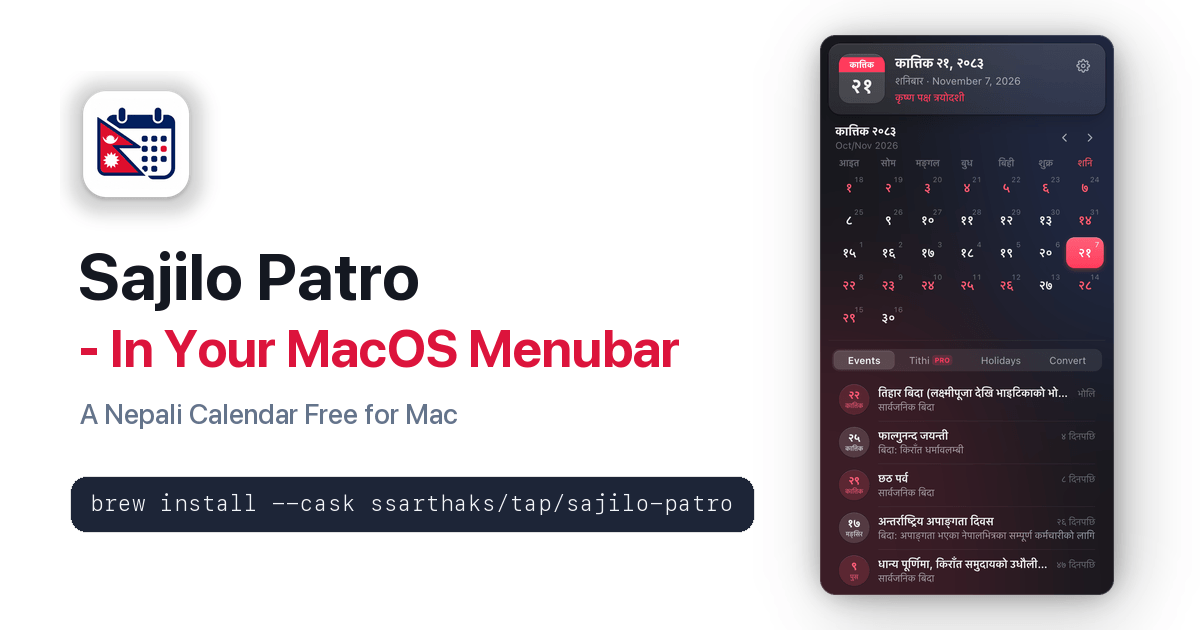
Lightweight, offline, and free to use Nepali calendar for the macOS menubar. Today's Bikram Sambat date next to your Mac's clock, desktop widgets, holidays, and tithi.

Sajilo Patro — Nepali Calendar for macOS Menu Bar — Overview

Overview1 / 12

Challenge

Millions of people in Nepal and abroad plan their lives by the Bikram Sambat calendar, but a Mac only knows the Gregorian one. Checking today's Nepali date, the next public holiday or a tithi meant opening a website or a phone app every time. A good answer had to feel native to macOS, be honest about where its dates come from, work offline, and respect privacy.
Solution

Built Sajilo Patro as a lightweight Tauri 2 menu bar app: Rust handles the menu bar item, the popover (a non-activating panel that opens even over full-screen apps), Open at login and licensing, while a React UI renders the calendar from the sajilo-patro dataset bundled inside the app. Around it: a Next.js website with a direct DMG download and a Homebrew cask, and an online licence service with Ed25519-signed receipts so Pro works offline after one activation.

Outcome

Released on 7 November 2026 as a free universal app for Apple Silicon and Intel Macs, installable with one Homebrew command or a DMG, and already on its twelfth release (2.3.1), with your Mac and Google Calendar events on their Nepali dates, one-click in-app updates, interactive desktop widgets and countdowns to every event. The same calendar engine ships to developers as the sajilo-patro npm package for payroll, HRMS and attendance software.

Architecture

Hover or tap a component to see what it does.

Mac users: Today's BS date beside the clock; clicking it opens the calendar popover, even over full-screen apps.

Key decisions

Why Tauri instead of Electron?

A small app with a Rust core for the macOS parts, while the calendar UI shares TypeScript with the npm package and the website.

Why a non-activating panel for the popover?

A normal window pulls you out of a full-screen app when it opens. An NSPanel that doesn't activate behaves like the system's own menu bar items.

Why bundle the dataset instead of fetching it?

The calendar must open instantly and work offline, and a local dataset means no tracking. Only the optional Pro licence talks to a server.

Why signed receipts for Pro?

One online activation per Mac returns a receipt the app verifies itself, so Pro works offline — and the server stores keys only as fingerprints, never the keys themselves.

Results

  • Released 7 Nov 2026 · now on version 2.3.1
  • Universal app: Apple Silicon and Intel, macOS 11+
  • One-command Homebrew install or DMG
  • Same engine published to npm as sajilo-patro

Overview

Sajilo Patro (सजिलो पात्रो) means "easy calendar" in Nepali. It is a menu bar app for macOS that shows today's Bikram Sambat date next to the clock and opens a month calendar with Nepal's public holidays, festivals and tithi in one click.

It is a solo product: I designed and built the app, the calendar dataset and npm package, the website, the release process and the licence service.

The app

The app is built with Tauri 2. Rust owns everything that has to feel native — the menu bar item, the popover, the Settings window, Open at login and licence checks — and a React UI renders the calendar and Settings.

The popover is a non-activating NSPanel, so it opens over full-screen apps without pulling you out of them, and closes on any click outside. It uses Liquid Glass on macOS 26 Tahoe and translucent glass on earlier versions, in Light and Dark mode.

Accurate dates, honestly labelled

Dates come from the sajilo-patro engine: offline BS ↔ AD conversion for BS 1970–2090 from a verified month-length table rather than an approximate formula, Government of Nepal public holidays for BS 2083 transcribed from the Ministry of Home Affairs notice, and tithi calculated at Kathmandu sunrise.

Every date carries a verification status and its source, and calculated values are labelled as calculated — so neither the app nor developers using the package are told something is official when it isn't.

Free and Pro

Everything needed to use the calendar is free: the menu bar date in any style (including a Custom builder), holidays, festivals, tithi, the converter, Nepali or English and offline use. Pro is a one-time NPR 299 licence for life on 2 Macs, adding 12 colour themes inspired by Nepal (each in light and dark), the upcoming tithi list and popup customisation.

A licence is activated online once per Mac. The server returns an Ed25519-signed receipt bound to that Mac, which the app verifies on its own, so Pro keeps working offline.

Distribution

Each release is a universal app for Apple Silicon and Intel, published as a DMG and as a Homebrew cask, so installing is one command: brew install --cask ssarthaks/tap/sajilo-patro. The website's /download link always points at the latest DMG.

Key Features & Capabilities

Feature 01

Today in the Menu Bar: The Bikram Sambat date sits beside the Mac's clock — day and month, with the weekday, or just the icon.

Feature 02

Holidays and Festivals: Government of Nepal public holidays and festivals for BS 2083, each with who it applies to (national, regional, community, women, education or disability).

Feature 03

Tithi for Every Day: The lunar day for today and any date you pick, calculated at Kathmandu sunrise and clearly labelled as calculated.

Feature 04

BS and AD Together: Every day shows both calendars, plus Events, Holidays and a BS → AD converter in tabs under the calendar.

Feature 05

Native Glass Design: Liquid Glass on macOS 26 Tahoe and translucent glass on earlier versions, in Light and Dark mode, with a Settings window styled like System Settings.

Feature 06

नेपाली or English: Use the calendar and Settings in either language.

Feature 07

Private and Offline: No account, no ads, no tracking. Dates come from a dataset inside the app; only the optional Pro licence is checked online.

Feature 08

Your Menu Bar, Free: Every style plus a Custom builder — just the day (२१), just the month, the weekday, the BS year, tithi or the AD date, with the icon left, right or hidden.

Feature 09

Pro (NPR 299, one-time): 12 colour themes inspired by Nepal, each in light and dark, the upcoming tithi list and popup customisation — lifetime, on 2 Macs.

Frequently Asked Questions

FAQ 01

How do I get a Nepali calendar for my menu bar on macOS?

Install Sajilo Patro by downloading the universal DMG from nepali-calendar.sarthaksharma.com.np or running 'brew install --cask ssarthaks/tap/sajilo-patro' in Terminal. It places today's Bikram Sambat (BS) date right in your Mac's menu bar beside the clock with zero CPU idle usage, full offline support, desktop widgets, and Google Calendar sync.

FAQ 02

What is Sajilo Patro?

Sajilo Patro is a free Nepali calendar for Mac. It shows today's Bikram Sambat (BS) date in the macOS menu bar, next to the clock, and opens a month calendar with Nepal's public holidays, festivals and tithi in one click.

FAQ 03

Is Sajilo Patro free?

Yes. The calendar, holidays, tithi, the BS → AD converter, Nepali or English and offline use are all free. Every menu bar style and the Custom menu bar builder are free too. An optional Pro licence (NPR 299, one-time, lifetime on 2 Macs) adds 12 themes (each in light and dark), the upcoming tithi list and popup customisation.

FAQ 04

How do I install Sajilo Patro?

Run brew install --cask ssarthaks/tap/sajilo-patro in Terminal, or download the DMG from nepali-calendar.sarthaksharma.com.np and drag the app into Applications. It needs macOS 11 Big Sur or later and runs on Apple Silicon and Intel Macs.

FAQ 05

Does Sajilo Patro work offline?

Yes. All dates, holidays and tithi come from a dataset inside the app. It has no account, ads or tracking; only the optional Pro licence is checked online.

FAQ 06

Can I use the Nepali calendar in my own app?

Yes. The same calendar engine is published on npm as sajilo-patro (npm install sajilo-patro): offline BS ↔ AD conversion, Nepal public holidays, working-day and payroll summaries and tithi, free to use including commercially.

FAQ 07

Who built Sajilo Patro?

Sarthak Sharma, a full-stack developer in Kathmandu, built Sajilo Patro end to end: the Tauri and Rust macOS app, the calendar dataset and npm package, the website and the licence service.